
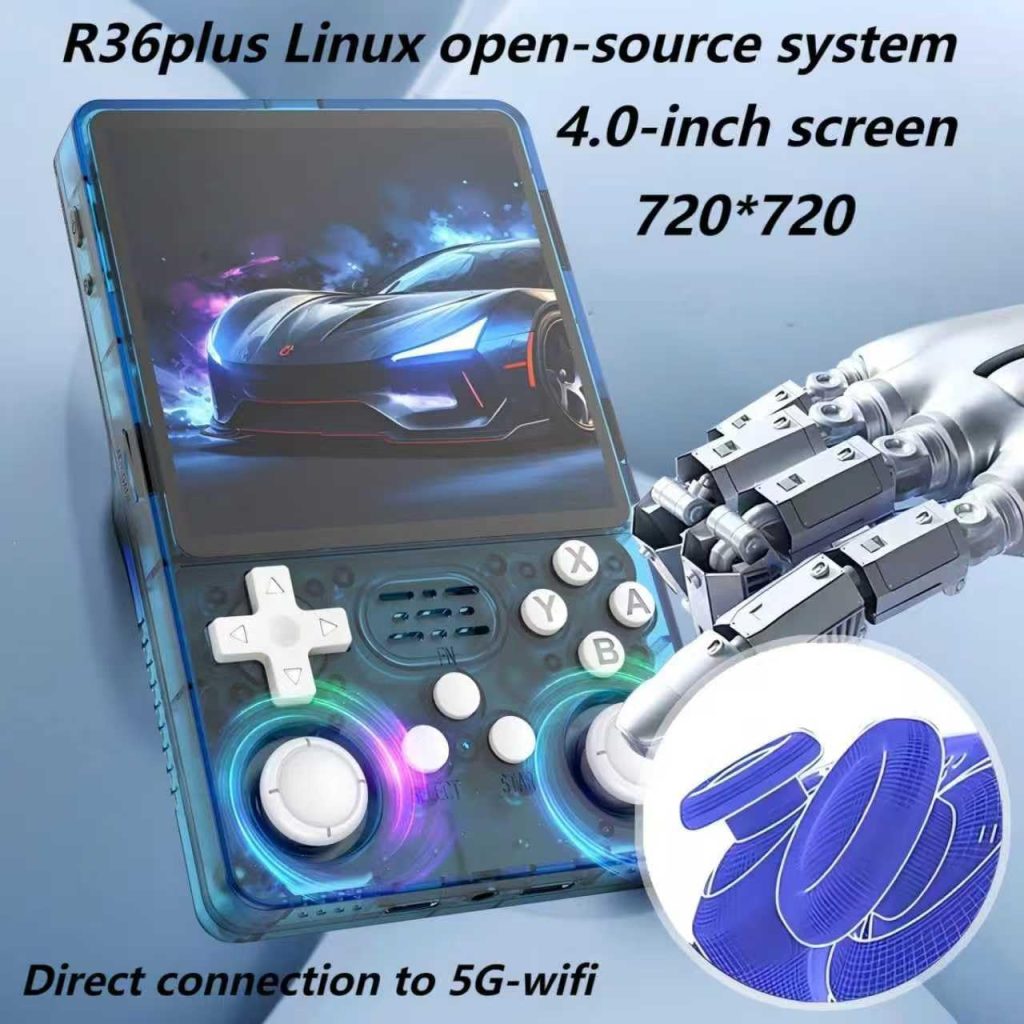
The 1:1 Aspect Ratio Advantage: Why Square Screens Win for Retro Gaming
Square screens on handhelds seem odd at first. We’re used to widescreen everything — phones, TVs, monitors. But for retro gaming, a 1:1 aspect ratio isn’t a gimmick. It’s genuinely useful, and in some cases, it’s the ideal choice.
Let’s explore why the R36S Plus and its 720×720 square display might be exactly what your retro gaming needs.
Understanding Aspect Ratios
First, a quick primer:
| Aspect Ratio | Shape | Common Uses |
|---|---|---|
| 4:3 | Slightly tall rectangle | CRT TVs, GBA, PS1, N64 |
| 16:9 | Wide rectangle | Modern TVs, PSP, modern games |
| 1:1 | Perfect square | Vertical arcade, specialised displays |
Most retro consoles output in 4:3. Classic arcade cabinets were often vertical (taller than wide). The question is: which modern screen handles these formats best?
Where 1:1 Screens Excel
1. Vertical Arcade Games
This is where square screens absolutely dominate.
Classic arcade shooters were designed for vertical CRT monitors:
- Galaga
- Donkey Kong
- 1942
- Pac-Man (yes, the original was vertical)
- Space Invaders
On a 4:3 horizontal screen, these games display with massive black bars on the sides — you’re using maybe 60% of your screen. On a 1:1 screen, they fill much more of the display area, giving you a larger, more playable image.
2. Nintendo DS Emulation
The NDS presents a unique challenge: two screens stacked vertically.
On a 4:3 horizontal screen:
- Both screens must be shrunk significantly
- Side-by-side layout wastes space
- Vertical stack results in tiny images
On a 1:1 square screen:
- Side-by-side arrangement works beautifully
- Each screen gets reasonable size
- More natural viewing experience
The R36S Plus with its 720×720 display can show both NDS screens at a comfortable size. It’s not perfect (nothing is for NDS on a single screen), but it’s one of the best solutions in this price range.
3. SNES and 4:3 Content
Here’s where it gets interesting. SNES games are 4:3 — wouldn’t a 4:3 screen be better?
Not necessarily.
On a 4:3 screen (like the R36 Pro’s 640×480):
- Games fill the screen perfectly… in theory
- But the screen is only 3.5 inches
- The actual game image is relatively small
On a 1:1 screen (like the R36S Plus’s 720×720):
- Games have small letterboxes top and bottom
- But the screen is 4 inches
- The actual game image is larger despite the letterboxing
- Higher resolution means sharper pixels
4. Game Boy and GBC
Original Game Boy games had a nearly square aspect ratio (10:9). On a 1:1 screen, they display almost perfectly with minimal adjustment.
Game Boy Colour maintains similar proportions. These games look fantastic on the R36S Plus — crisp, clear, and properly proportioned.
Where 1:1 Screens Compromise
Let’s be fair. Square screens aren’t perfect for everything:
GBA Games
Game Boy Advance is 3:2 (wider than 4:3). On a 1:1 screen, GBA games have letterboxing on top and bottom. It’s perfectly playable, but you’re not using the full screen.
PSP Games
The PSP’s 16:9 widescreen content has significant letterboxing on a square display. If PSP is your primary focus, a widescreen handheld might suit you better.
PS1 and N64
Most 3D games from this era are 4:3. They display well on 1:1 screens with mild letterboxing, but technically a 4:3 screen would be more efficient.
The R36S Plus Advantage
The R36 Ultra also has a 1:1 720×720 screen. So why recommend the R36S Plus instead?
Same screen, different support.
| Feature | R36S Plus | R36 Ultra |
|---|---|---|
| Screen | 4″ 720×720 1:1 | 4″ 720×720 1:1 |
| Resolution | Identical | Identical |
| ArkOS Support | Dedicated R3XS build | arkos4clone only |
| Firmware Options | Multiple | Limited |
| Clone Status | Original | EmuELEC Clone |
| Recommended | Yes | No |
The screen is the same. The experience is not. With the R36S Plus, you get proper firmware support, regular updates, and device-specific optimisations. The R36 Ultra gives you a square screen with clone firmware headaches.
Practical Gaming Scenarios
You Mostly Play: NES, SNES, Mega Drive
Verdict: 1:1 works great. The larger screen compensates for mild letterboxing.
You Mostly Play: GBA
Verdict: 1:1 works but isn’t optimal. Consider if screen size matters more than perfect fit.
You Mostly Play: PS1, N64
Verdict: 1:1 is fine. Most games are 4:3, displayed with small letterboxes.
You Mostly Play: PSP
Verdict: 1:1 isn’t ideal. Significant letterboxing due to widescreen content.
You Mostly Play: Vertical Arcade
Verdict: 1:1 is perfect. This is what square screens were made for.
You Mostly Play: Nintendo DS
Verdict: 1:1 is excellent. Best dual-screen arrangement on a budget handheld.
Our Recommendation
The 1:1 aspect ratio isn’t a gimmick or a compromise — it’s a deliberate design choice that benefits many retro gaming scenarios. If you play:
- Vertical arcade games
- Nintendo DS titles
- A variety of retro consoles
…then the R36S Plus with its 720×720 square display is an excellent choice.
Just make sure you buy the original R36S Plus with dedicated ArkOS support — not the clone alternatives with their workaround firmware.
Ready to Buy?
Experience the 1:1 advantage with proper software support.
R36S Plus – Square Done RightFurther Reading
- R36 Plus on Handhelds Wiki — Full specifications
- R36 Ultra on Handhelds Wiki — Same screen, clone firmware
Happy gaming!