
R36S & R36XX Operating Systems: Complete Guide to Custom Firmware Options | HobbyistNirvana

R36S & R36XX Operating Systems: Complete Guide to Custom Firmware Options

Your R36S or R36XX is capable of running far more than the stock firmware it ships with. The retro gaming community has developed numerous custom operating systems, each offering unique features and experiences. In this guide, we’ll explore every OS option available for your device.

Why Install a Custom OS?

Before diving into options, here’s why you should consider upgrading:

🚀

Better Performance

Optimised emulators and configurations

🎮

More Features

RetroAchievements, netplay, themes, ports

💾

Reliable Storage

Ditch the cheap stock SD card

🔄

Active Development

Regular updates and bug fixes

🎨

Customisation

Themes, layouts, and personalisation

âš ī¸ Stock SD Card Warning

The stock SD card included with your device is typically low-quality and will fail eventually. Installing a custom OS on a quality Samsung EVO Plus or SanDisk Extreme card solves this problem.

Quick Compatibility Overview

Operating System R36S R36XX Difficulty Best For
ArkOS (Community) ✅ ✅ Easy Most users
MinUI ✅ ✅ Easy Minimalists
AmberELEC ✅ ✅ Easy Stability seekers
PAN4ELEC ✅ ✅ Easy PAN4L fans
ArkOS (Official) ✅ ✅ Easy Feature hunters
ROCKNIX ✅ ✅ Easy All-rounders
JELOS âš ī¸ âš ī¸ Moderate Tinkerers
UnofficialOS ✅ ✅ Moderate Experimenters
cHAos ✅ ✅ Moderate Multi-panel fans
Lakka ✅ ✅ Moderate RetroArch purists
Xorg ✅ ✅ Advanced Linux enthusiasts
Gentoo ✅ ✅ Expert Power users

Legend: ✅ = Full support | âš ī¸ = Limited/Legacy support

Recommended Operating Systems

1 ArkOS Community Maintained Image

Best for: Most users who want a reliable, feature-rich experience

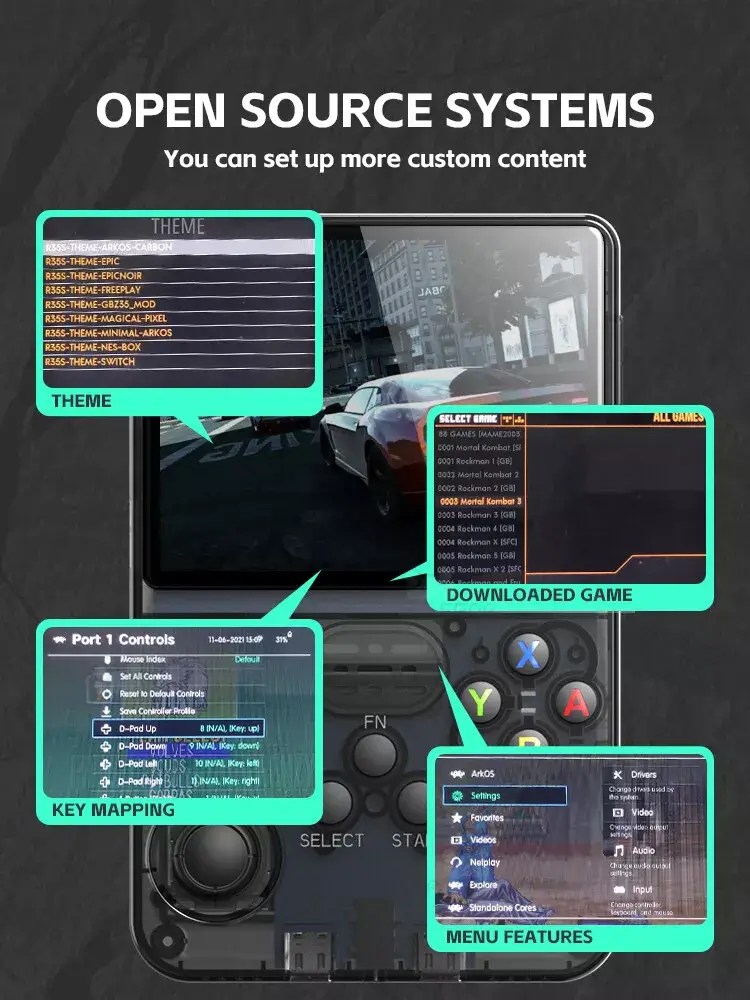
The community-maintained ArkOS image for R3XS devices is currently the most popular choice for R36S and R36XX owners. Maintained by AeolusUX, this fork focuses specifically on the R36S family.

Key Features:

  • Optimised specifically for R36S/R36XX hardware
  • Regular updates and active community support
  • RetroAchievements integration
  • PortMaster support for standalone games
  • Extensive theme library
  • WiFi support (essential for R36XX’s built-in WiFi)
✅ Pros
  • Easy installation via Rufus
  • Excellent Discord community support
  • Best compatibility with R36S variants
  • Frequent updates
❌ Cons
  • Requires separate download from official ArkOS
Download ArkOS Community →
💡 Pro Tip

This is the version we recommend for most users. It’s specifically tailored for R36S devices and receives regular updates.

2 MinUI

Best for: Users who prefer simplicity and clean interfaces

MinUI takes a radically different approach — stripping away complexity to deliver a fast, minimal interface. If you find other custom firmwares overwhelming, MinUI might be perfect.

Key Features:

  • Ultra-clean, distraction-free interface
  • Lightning-fast boot times
  • Minimal resource usage
  • Simple folder-based game organisation
  • No bloat or unnecessary features
✅ Pros
  • Fastest boot time of any custom OS
  • Perfect for pick-up-and-play gaming
  • Very low learning curve
  • Extremely stable
❌ Cons
  • Limited customisation options
  • No RetroAchievements
  • Fewer emulator options
  • No PortMaster support
Download MinUI →
💡 Pro Tip

MinUI is excellent for dedicated devices — set up one system (like GBA only) and enjoy a focused gaming experience.

3 AmberELEC

Best for: Users prioritising stability over bleeding-edge features

AmberELEC (formerly 351ELEC) is a mature, stable custom firmware built on the EmuELEC base. It’s known for reliability and a polished out-of-box experience.

Key Features:

  • EmulationStation frontend
  • RetroAchievements support
  • Extensive controller support
  • Built-in scraper for game artwork
  • Bezels and overlays included
  • Netplay capability
✅ Pros
  • Very stable and well-tested
  • Great default configuration
  • Strong community documentation
  • Good theme selection
❌ Cons
  • Updates less frequently than ArkOS
  • Slightly higher resource usage
  • Some advanced features require configuration
Download AmberELEC →

4 PAN4ELEC

Best for: Users who want PAN4L’s interface with EmuELEC’s stability

PAN4ELEC combines the PAN4L frontend aesthetic with AmberELEC’s reliable backend. It offers a unique visual experience while maintaining solid performance.

Key Features:

  • Distinctive PAN4L-style interface
  • AmberELEC stability underneath
  • Custom themes and layouts
  • RetroAchievements integration
  • Good emulator compatibility
✅ Pros
  • Unique visual presentation
  • Stable foundation
  • Different from typical ES frontends
❌ Cons
  • Smaller community than mainstream options
  • Updates tied to AmberELEC releases
  • Less documentation available

Download: Search for PAN4ELEC releases in retro gaming communities

5 ArkOS (Official)

Best for: Users who want the original ArkOS experience

The official ArkOS by christianhaitian is the parent project from which many forks derive. While the community R3XS image is recommended for R36S specifically, the official version remains a solid choice.

Key Features:

  • Original ArkOS experience
  • Broad device support
  • RetroAchievements
  • PortMaster support
  • Active development
✅ Pros
  • Direct from the source
  • Well-documented
  • Large user base
❌ Cons
  • R36S support may lag behind community fork
  • Generic builds vs device-specific optimisation
Download ArkOS Official →

6 cHAos Multi-Panel R3xS

Best for: Users wanting a unique multi-panel interface

cHAos offers a distinctive multi-panel visual approach to game browsing. It’s designed for users who want something visually different from standard EmulationStation-based systems.

Key Features:

  • Unique multi-panel interface
  • Visual game browsing experience
  • Custom artwork displays
  • Built specifically for R3XS devices
✅ Pros
  • Visually striking interface
  • Good for game discovery
  • Different browsing experience
❌ Cons
  • Niche appeal
  • Smaller support community
  • May require adjustment period

Download: Search retro gaming forums and Discord servers for cHAos releases

7 ROCKNIX

Best for: Users wanting a modern, actively developed OS

ROCKNIX is a relatively newer custom firmware that’s gained popularity for its active development and modern approach. It’s a community-driven project with regular updates.

Key Features:

  • Modern EmulationStation-ES frontend
  • RetroAchievements support
  • Cloud save synchronisation
  • OTA (Over-The-Air) updates
  • Strong WiFi integration (great for R36XX)
  • PortMaster support
✅ Pros
  • Very active development
  • Modern features like cloud saves
  • Excellent WiFi support
  • Great for R36XX with built-in WiFi
❌ Cons
  • Relatively newer project
  • Some features still in development
Download ROCKNIX →
💡 Pro Tip

ROCKNIX is an excellent choice for R36XX owners who want to maximise the built-in WiFi functionality.

8 JELOS

Best for: Tinkerers and those who like to customise

JELOS (Just Enough Linux OS) was a popular choice that has now been succeeded by ROCKNIX. However, legacy builds still work and some users prefer it.

Key Features:

  • Lightweight Linux-based OS
  • RetroAchievements
  • Cloud backup support
  • EmulationStation frontend
✅ Pros
  • Proven stability
  • Good documentation exists
  • Lightweight
❌ Cons
  • Development has moved to ROCKNIX
  • No new updates
  • Best to migrate to ROCKNIX
â„šī¸ Note

JELOS development has transitioned to ROCKNIX. We recommend new users choose ROCKNIX instead.

9 UnofficialOS

Best for: Experimenters who want alternative builds

UnofficialOS provides alternative builds and experimental features that may not be in mainstream firmwares. It’s for users who like to try new things.

Key Features:

  • Experimental features
  • Alternative configurations
  • Community-driven development
✅ Pros
  • Access to experimental features
  • Sometimes includes fixes before official releases
❌ Cons
  • Less stable than mainstream options
  • Limited support
  • Not recommended for beginners

Advanced Operating Systems

âš ī¸ Advanced Users Only

The following options are for advanced users comfortable with Linux and command-line interfaces.

10 Lakka

Best for: RetroArch purists who want a dedicated RetroArch experience

Lakka is essentially RetroArch turned into a full operating system. It boots directly into RetroArch’s XMB interface, similar to a PlayStation 3.

Key Features:

  • Pure RetroArch experience
  • XMB (PS3-style) interface
  • All RetroArch features available
  • Netplay support
  • Shader support
  • RetroAchievements
✅ Pros
  • If you love RetroArch, you’ll love Lakka
  • Consistent interface across all systems
  • Powerful customisation within RetroArch
❌ Cons
  • Learning curve if unfamiliar with RetroArch
  • Less intuitive than EmulationStation-based options
  • Configuration can be complex
Download Lakka →

11 Xorg (Linux Desktop)

Best for: Linux enthusiasts who want a full desktop experience

For advanced users, it’s possible to run a full Linux desktop environment with Xorg on R36S/R36XX hardware. This turns your handheld into a tiny Linux computer.

Key Features:

  • Full Linux desktop environment
  • Run desktop applications
  • SSH access
  • Development environment
  • Terminal access
✅ Pros
  • Full Linux flexibility
  • Run any compatible Linux software
  • Great for learning Linux
❌ Cons
  • Not optimised for gaming
  • Requires significant Linux knowledge
  • Touch screen/controls require configuration
  • Battery life may suffer
âš ī¸ Not for Gaming

This is not recommended for gaming. Consider this only if you want to experiment with Linux on handheld hardware.

12 Gentoo

Best for: Expert users who want complete control

Gentoo Linux can be installed on RK3326 devices for those who want the ultimate in customisation. This is strictly for experienced Linux users.

Key Features:

  • Compile everything from source
  • Complete system customisation
  • Maximum performance optimisation
  • Total control over every package
✅ Pros
  • Ultimate flexibility
  • Learn exactly how Linux works
  • Optimise for specific use cases
❌ Cons
  • Extremely time-consuming setup
  • Expert-level Linux knowledge required
  • Not practical for most users
  • Compilation takes forever on device hardware
🚨 Expert Only

Unless you’re a seasoned Linux administrator who enjoys compiling kernels for fun, this is not for you.

Which OS Should You Choose?

Our Recommendations

🎮 For Beginners

ArkOS Community Maintained Image

Easy to install, great community support, works perfectly on both R36S and R36XX

✨ For Minimalists

MinUI

Clean, fast, no-nonsense — perfect for dedicated gaming

đŸ“ļ For R36XX WiFi Users

ROCKNIX or ArkOS Community

Best WiFi integration, OTA updates utilise built-in WiFi

🔒 For Stability Seekers

AmberELEC

Mature, well-tested, reliable daily driver

đŸ§Ē For Experimenters

ROCKNIX or UnofficialOS

Latest features, active development

đŸŽ›ī¸ For RetroArch Fans

Lakka

Pure RetroArch experience, maximum emulator control

Installation Basics

Regardless of which OS you choose, the installation process is similar:

What You’ll Need

  • Quality MicroSD card — Samsung EVO Plus 128GB recommended
  • MicroSD card reader — USB 3.0 preferred
  • Rufus or balenaEtcher — For Windows (or dd for Linux/Mac)
  • Downloaded OS image

General Steps

  1. Download the OS image for R36S/R36XX
  2. Extract the image if compressed (.gz, .xz, .7z)
  3. Flash using Rufus or balenaEtcher
  4. Insert SD card into device (Slot 1/TF1)
  5. Boot and wait for first-time setup
  6. Transfer your games to the appropriate folder
đŸ‡ŽđŸ‡ŗ India-Specific

Purchase quality SD cards from Amazon India or Flipkart. Budget ₹800-1,200 for 128GB. Avoid suspiciously cheap cards — counterfeits are common and will corrupt your data.

Comparison Table: Top 5 Recommendations

Feature ArkOS Community MinUI AmberELEC ROCKNIX Lakka
Ease of Use ⭐⭐⭐⭐⭐ ⭐⭐⭐⭐⭐ ⭐⭐⭐⭐ ⭐⭐⭐⭐ ⭐⭐⭐
Features ⭐⭐⭐⭐⭐ ⭐⭐ ⭐⭐⭐⭐ ⭐⭐⭐⭐⭐ ⭐⭐⭐⭐
Performance ⭐⭐⭐⭐⭐ ⭐⭐⭐⭐⭐ ⭐⭐⭐⭐ ⭐⭐⭐⭐ ⭐⭐⭐⭐
Community ⭐⭐⭐⭐⭐ ⭐⭐⭐ ⭐⭐⭐⭐ ⭐⭐⭐⭐ ⭐⭐⭐
Updates ⭐⭐⭐⭐⭐ ⭐⭐⭐ ⭐⭐⭐ ⭐⭐⭐⭐⭐ ⭐⭐⭐
WiFi Support ⭐⭐⭐⭐ ⭐⭐ ⭐⭐⭐ ⭐⭐⭐⭐⭐ ⭐⭐⭐
RetroAchievements ✅ ❌ ✅ ✅ ✅
PortMaster ✅ ❌ ✅ ✅ ❌

Troubleshooting Common Issues

“Device won’t boot after flashing”

  • Verify you downloaded the correct image for R36S/R36XX
  • Re-flash using a different tool (try balenaEtcher if Rufus fails)
  • Try a different SD card

“WiFi not working on R36XX”

  • Ensure the OS supports R36XX’s built-in WiFi chip
  • Check WiFi settings are enabled
  • ArkOS Community and ROCKNIX have best WiFi support

“Games not appearing”

  • Check folder names match expected format (usually lowercase)
  • Refresh game lists in settings
  • Verify file formats are supported

“Performance issues”

  • Ensure device type is correctly set in options
  • Try a different OS — some perform better for specific systems
  • Check if overclocking options are available

Ready to Buy?

Get your authentic device from HobbyistNirvana:

âš ī¸ Clone Warning

This guide is for authentic R36S and R36XX devices. Clone devices may have different hardware that’s incompatible with these operating systems.

Quick Reference: Download Links

OS Download
ArkOS Community github.com/AeolusUX/ArkOS-R3XS
MinUI github.com/shauninman/MinUI
AmberELEC github.com/AmberELEC/AmberELEC
ArkOS Official github.com/christianhaitian/arkos
ROCKNIX github.com/ROCKNIX/distribution
Lakka lakka.tv/get

Happy gaming! Got questions? Drop them in the comments below.

Written by the HobbyistNirvana Team — your fellow retro gaming enthusiasts.

R36S & R36XX Operating Systems: Complete Guide to Custom Firmware Options | HobbyistNirvana

R36S & R36XX Operating Systems: Complete Guide to Custom Firmware Options

Your R36S or R36XX is capable of running far more than the stock firmware it ships with. The retro gaming community has developed numerous custom operating systems, each offering unique features and experiences. In this guide, we’ll explore every OS option available for your device.

Why Install a Custom OS?

Before diving into options, here’s why you should consider upgrading:

🚀

Better Performance

Optimised emulators and configurations

🎮

More Features

RetroAchievements, netplay, themes, ports

💾

Reliable Storage

Ditch the cheap stock SD card

🔄

Active Development

Regular updates and bug fixes

🎨

Customisation

Themes, layouts, and personalisation

âš ī¸ Stock SD Card Warning

The stock SD card included with your device is typically low-quality and will fail eventually. Installing a custom OS on a quality Samsung EVO Plus or SanDisk Extreme card solves this problem.

Quick Compatibility Overview

Operating System R36S R36XX Difficulty Best For
ArkOS (Community) ✅ ✅ Easy Most users
MinUI ✅ ✅ Easy Minimalists
AmberELEC ✅ ✅ Easy Stability seekers
PAN4ELEC ✅ ✅ Easy PAN4L fans
ArkOS (Official) ✅ ✅ Easy Feature hunters
ROCKNIX ✅ ✅ Easy All-rounders
JELOS âš ī¸ âš ī¸ Moderate Tinkerers
UnofficialOS ✅ ✅ Moderate Experimenters
cHAos ✅ ✅ Moderate Multi-panel fans
Lakka ✅ ✅ Moderate RetroArch purists
Xorg ✅ ✅ Advanced Linux enthusiasts
Gentoo ✅ ✅ Expert Power users

Legend: ✅ = Full support | âš ī¸ = Limited/Legacy support

Recommended Operating Systems

1 ArkOS Community Maintained Image

Best for: Most users who want a reliable, feature-rich experience

The community-maintained ArkOS image for R3XS devices is currently the most popular choice for R36S and R36XX owners. Maintained by AeolusUX, this fork focuses specifically on the R36S family.

Key Features:

  • Optimised specifically for R36S/R36XX hardware
  • Regular updates and active community support
  • RetroAchievements integration
  • PortMaster support for standalone games
  • Extensive theme library
  • WiFi support (essential for R36XX’s built-in WiFi)
✅ Pros
  • Easy installation via Rufus
  • Excellent Discord community support
  • Best compatibility with R36S variants
  • Frequent updates
❌ Cons
  • Requires separate download from official ArkOS
Download ArkOS Community →
💡 Pro Tip

This is the version we recommend for most users. It’s specifically tailored for R36S devices and receives regular updates.

2 MinUI

Best for: Users who prefer simplicity and clean interfaces

MinUI takes a radically different approach — stripping away complexity to deliver a fast, minimal interface. If you find other custom firmwares overwhelming, MinUI might be perfect.

Key Features:

  • Ultra-clean, distraction-free interface
  • Lightning-fast boot times
  • Minimal resource usage
  • Simple folder-based game organisation
  • No bloat or unnecessary features
✅ Pros
  • Fastest boot time of any custom OS
  • Perfect for pick-up-and-play gaming
  • Very low learning curve
  • Extremely stable
❌ Cons
  • Limited customisation options
  • No RetroAchievements
  • Fewer emulator options
  • No PortMaster support
Download MinUI →
💡 Pro Tip

MinUI is excellent for dedicated devices — set up one system (like GBA only) and enjoy a focused gaming experience.

3 AmberELEC

Best for: Users prioritising stability over bleeding-edge features

AmberELEC (formerly 351ELEC) is a mature, stable custom firmware built on the EmuELEC base. It’s known for reliability and a polished out-of-box experience.

Key Features:

  • EmulationStation frontend
  • RetroAchievements support
  • Extensive controller support
  • Built-in scraper for game artwork
  • Bezels and overlays included
  • Netplay capability
✅ Pros
  • Very stable and well-tested
  • Great default configuration
  • Strong community documentation
  • Good theme selection
❌ Cons
  • Updates less frequently than ArkOS
  • Slightly higher resource usage
  • Some advanced features require configuration
Download AmberELEC →

4 PAN4ELEC

Best for: Users who want PAN4L’s interface with EmuELEC’s stability

PAN4ELEC combines the PAN4L frontend aesthetic with AmberELEC’s reliable backend. It offers a unique visual experience while maintaining solid performance.

Key Features:

  • Distinctive PAN4L-style interface
  • AmberELEC stability underneath
  • Custom themes and layouts
  • RetroAchievements integration
  • Good emulator compatibility
✅ Pros
  • Unique visual presentation
  • Stable foundation
  • Different from typical ES frontends
❌ Cons
  • Smaller community than mainstream options
  • Updates tied to AmberELEC releases
  • Less documentation available

Download: Search for PAN4ELEC releases in retro gaming communities

5 ArkOS (Official)

Best for: Users who want the original ArkOS experience

The official ArkOS by christianhaitian is the parent project from which many forks derive. While the community R3XS image is recommended for R36S specifically, the official version remains a solid choice.

Key Features:

  • Original ArkOS experience
  • Broad device support
  • RetroAchievements
  • PortMaster support
  • Active development
✅ Pros
  • Direct from the source
  • Well-documented
  • Large user base
❌ Cons
  • R36S support may lag behind community fork
  • Generic builds vs device-specific optimisation
Download ArkOS Official →

6 cHAos Multi-Panel R3xS

Best for: Users wanting a unique multi-panel interface

cHAos offers a distinctive multi-panel visual approach to game browsing. It’s designed for users who want something visually different from standard EmulationStation-based systems.

Key Features:

  • Unique multi-panel interface
  • Visual game browsing experience
  • Custom artwork displays
  • Built specifically for R3XS devices
✅ Pros
  • Visually striking interface
  • Good for game discovery
  • Different browsing experience
❌ Cons
  • Niche appeal
  • Smaller support community
  • May require adjustment period

Download: Search retro gaming forums and Discord servers for cHAos releases

7 ROCKNIX

Best for: Users wanting a modern, actively developed OS

ROCKNIX is a relatively newer custom firmware that’s gained popularity for its active development and modern approach. It’s a community-driven project with regular updates.

Key Features:

  • Modern EmulationStation-ES frontend
  • RetroAchievements support
  • Cloud save synchronisation
  • OTA (Over-The-Air) updates
  • Strong WiFi integration (great for R36XX)
  • PortMaster support
✅ Pros
  • Very active development
  • Modern features like cloud saves
  • Excellent WiFi support
  • Great for R36XX with built-in WiFi
❌ Cons
  • Relatively newer project
  • Some features still in development
Download ROCKNIX →
💡 Pro Tip

ROCKNIX is an excellent choice for R36XX owners who want to maximise the built-in WiFi functionality.

8 JELOS

Best for: Tinkerers and those who like to customise

JELOS (Just Enough Linux OS) was a popular choice that has now been succeeded by ROCKNIX. However, legacy builds still work and some users prefer it.

Key Features:

  • Lightweight Linux-based OS
  • RetroAchievements
  • Cloud backup support
  • EmulationStation frontend
✅ Pros
  • Proven stability
  • Good documentation exists
  • Lightweight
❌ Cons
  • Development has moved to ROCKNIX
  • No new updates
  • Best to migrate to ROCKNIX
â„šī¸ Note

JELOS development has transitioned to ROCKNIX. We recommend new users choose ROCKNIX instead.

9 UnofficialOS

Best for: Experimenters who want alternative builds

UnofficialOS provides alternative builds and experimental features that may not be in mainstream firmwares. It’s for users who like to try new things.

Key Features:

  • Experimental features
  • Alternative configurations
  • Community-driven development
✅ Pros
  • Access to experimental features
  • Sometimes includes fixes before official releases
❌ Cons
  • Less stable than mainstream options
  • Limited support
  • Not recommended for beginners

Advanced Operating Systems

âš ī¸ Advanced Users Only

The following options are for advanced users comfortable with Linux and command-line interfaces.

10 Lakka

Best for: RetroArch purists who want a dedicated RetroArch experience

Lakka is essentially RetroArch turned into a full operating system. It boots directly into RetroArch’s XMB interface, similar to a PlayStation 3.

Key Features:

  • Pure RetroArch experience
  • XMB (PS3-style) interface
  • All RetroArch features available
  • Netplay support
  • Shader support
  • RetroAchievements
✅ Pros
  • If you love RetroArch, you’ll love Lakka
  • Consistent interface across all systems
  • Powerful customisation within RetroArch
❌ Cons
  • Learning curve if unfamiliar with RetroArch
  • Less intuitive than EmulationStation-based options
  • Configuration can be complex
Download Lakka →

11 Xorg (Linux Desktop)

Best for: Linux enthusiasts who want a full desktop experience

For advanced users, it’s possible to run a full Linux desktop environment with Xorg on R36S/R36XX hardware. This turns your handheld into a tiny Linux computer.

Key Features:

  • Full Linux desktop environment
  • Run desktop applications
  • SSH access
  • Development environment
  • Terminal access
✅ Pros
  • Full Linux flexibility
  • Run any compatible Linux software
  • Great for learning Linux
❌ Cons
  • Not optimised for gaming
  • Requires significant Linux knowledge
  • Touch screen/controls require configuration
  • Battery life may suffer
âš ī¸ Not for Gaming

This is not recommended for gaming. Consider this only if you want to experiment with Linux on handheld hardware.

12 Gentoo

Best for: Expert users who want complete control

Gentoo Linux can be installed on RK3326 devices for those who want the ultimate in customisation. This is strictly for experienced Linux users.

Key Features:

  • Compile everything from source
  • Complete system customisation
  • Maximum performance optimisation
  • Total control over every package
✅ Pros
  • Ultimate flexibility
  • Learn exactly how Linux works
  • Optimise for specific use cases
❌ Cons
  • Extremely time-consuming setup
  • Expert-level Linux knowledge required
  • Not practical for most users
  • Compilation takes forever on device hardware
🚨 Expert Only

Unless you’re a seasoned Linux administrator who enjoys compiling kernels for fun, this is not for you.

Which OS Should You Choose?

Our Recommendations

🎮 For Beginners

ArkOS Community Maintained Image

Easy to install, great community support, works perfectly on both R36S and R36XX

✨ For Minimalists

MinUI

Clean, fast, no-nonsense — perfect for dedicated gaming

đŸ“ļ For R36XX WiFi Users

ROCKNIX or ArkOS Community

Best WiFi integration, OTA updates utilise built-in WiFi

🔒 For Stability Seekers

AmberELEC

Mature, well-tested, reliable daily driver

đŸ§Ē For Experimenters

ROCKNIX or UnofficialOS

Latest features, active development

đŸŽ›ī¸ For RetroArch Fans

Lakka

Pure RetroArch experience, maximum emulator control

Installation Basics

Regardless of which OS you choose, the installation process is similar:

What You’ll Need

  • Quality MicroSD card — Samsung EVO Plus 128GB recommended
  • MicroSD card reader — USB 3.0 preferred
  • Rufus or balenaEtcher — For Windows (or dd for Linux/Mac)
  • Downloaded OS image

General Steps

  1. Download the OS image for R36S/R36XX
  2. Extract the image if compressed (.gz, .xz, .7z)
  3. Flash using Rufus or balenaEtcher
  4. Insert SD card into device (Slot 1/TF1)
  5. Boot and wait for first-time setup
  6. Transfer your games to the appropriate folder
đŸ‡ŽđŸ‡ŗ India-Specific

Purchase quality SD cards from Amazon India or Flipkart. Budget ₹800-1,200 for 128GB. Avoid suspiciously cheap cards — counterfeits are common and will corrupt your data.

Comparison Table: Top 5 Recommendations

Feature ArkOS Community MinUI AmberELEC ROCKNIX Lakka
Ease of Use ⭐⭐⭐⭐⭐ ⭐⭐⭐⭐⭐ ⭐⭐⭐⭐ ⭐⭐⭐⭐ ⭐⭐⭐
Features ⭐⭐⭐⭐⭐ ⭐⭐ ⭐⭐⭐⭐ ⭐⭐⭐⭐⭐ ⭐⭐⭐⭐
Performance ⭐⭐⭐⭐⭐ ⭐⭐⭐⭐⭐ ⭐⭐⭐⭐ ⭐⭐⭐⭐ ⭐⭐⭐⭐
Community ⭐⭐⭐⭐⭐ ⭐⭐⭐ ⭐⭐⭐⭐ ⭐⭐⭐⭐ ⭐⭐⭐
Updates ⭐⭐⭐⭐⭐ ⭐⭐⭐ ⭐⭐⭐ ⭐⭐⭐⭐⭐ ⭐⭐⭐
WiFi Support ⭐⭐⭐⭐ ⭐⭐ ⭐⭐⭐ ⭐⭐⭐⭐⭐ ⭐⭐⭐
RetroAchievements ✅ ❌ ✅ ✅ ✅
PortMaster ✅ ❌ ✅ ✅ ❌

Troubleshooting Common Issues

“Device won’t boot after flashing”

  • Verify you downloaded the correct image for R36S/R36XX
  • Re-flash using a different tool (try balenaEtcher if Rufus fails)
  • Try a different SD card

“WiFi not working on R36XX”

  • Ensure the OS supports R36XX’s built-in WiFi chip
  • Check WiFi settings are enabled
  • ArkOS Community and ROCKNIX have best WiFi support

“Games not appearing”

  • Check folder names match expected format (usually lowercase)
  • Refresh game lists in settings
  • Verify file formats are supported

“Performance issues”

  • Ensure device type is correctly set in options
  • Try a different OS — some perform better for specific systems
  • Check if overclocking options are available

Ready to Buy?

Get your authentic device from HobbyistNirvana:

âš ī¸ Clone Warning

This guide is for authentic R36S and R36XX devices. Clone devices may have different hardware that’s incompatible with these operating systems.

Quick Reference: Download Links

OS Download
ArkOS Community github.com/AeolusUX/ArkOS-R3XS
MinUI github.com/shauninman/MinUI
AmberELEC github.com/AmberELEC/AmberELEC
ArkOS Official github.com/christianhaitian/arkos
ROCKNIX github.com/ROCKNIX/distribution
Lakka lakka.tv/get

Happy gaming! Got questions? Drop them in the comments below.

Written by the HobbyistNirvana Team — your fellow retro gaming enthusiasts.

Leave a Comment

Your email address will not be published. Required fields are marked *

Shopping Cart

Enter your email and unlock amazing deals!

This field is required

Get ready to unwrap the gift of savings!

Unlock exclusive deals awaiting you

150OFF

Your exclusive code is ready! Copy it now!

Get 150 off now!