
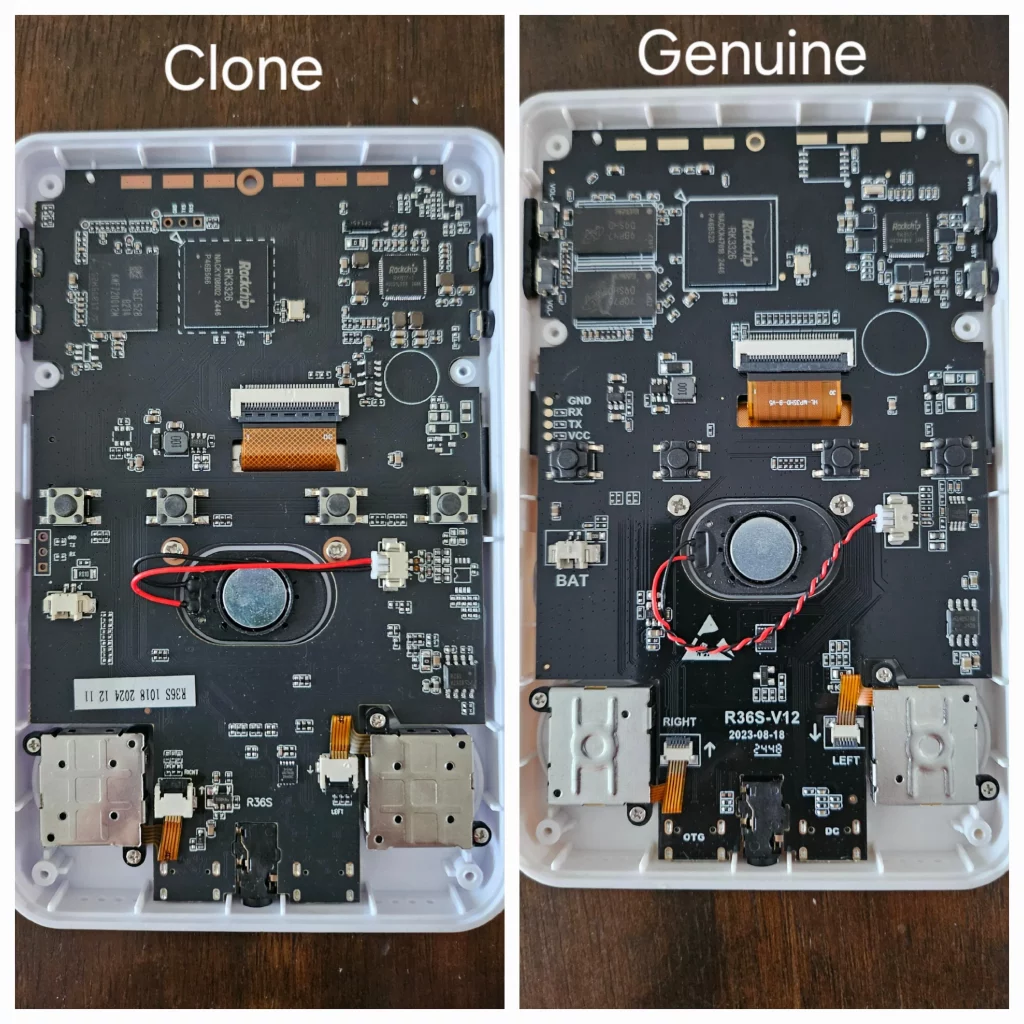
R36S Clone vs Genuine: Complete Identification Guide
The R36S has become so popular that the market is now flooded with clones. These knockoffs look nearly identical in product photos but deliver a far inferior experience. This guide will teach you exactly how to identify a fake before you buy — and what to do if you already own one.
Why Clones Are a Problem
R36S clones aren’t just “budget alternatives” — they’re fundamentally different devices with serious issues:
| Aspect | Genuine R36S | Clone |
|---|---|---|
| Screen | Vibrant IPS, wide viewing angles | Washed-out TN, poor angles |
| RAM | 1GB (dual chips) | 512MB (single chip) |
| Firmware | ArkOS/Stock works perfectly | Black screen, crashes, incompatible |
| Build Quality | Solid, responsive buttons | Creaky plastic, mushy buttons |
| SD Card | Reliable storage | Cheap cards that fail quickly |
| Custom Firmware | Full support (ArkOS, ROCKNIX) | Limited or no support |
A clone might save you ₹500-1000 upfront, but you’ll get a device with half the RAM, an inferior screen, and no firmware support. Many buyers end up purchasing a genuine unit anyway — paying twice.
Visual Identification: Hardware Differences
Clones look similar in photos, but in person, there are telltale signs. Here’s everything you need to check:
🔍 Front Face Inspection
X Button Font Style
Clones often have a crooked/italic X or very thin font. The blue colour may also be a darker shade than genuine units. This is one of the most reliable visual tells.
A/B/X/Y Button Colours
Genuine units have consistent, vibrant button colours. Clones often have slightly off shades — the blue may be darker, red may be more orange-tinted.
Start/Select Button Spacing
On genuine units, Start and Select buttons have consistent spacing. Clones sometimes have uneven or tighter spacing between these buttons.
D-Pad Quality
Genuine R36S has a responsive D-pad with good tactile feedback. Clone D-pads feel mushy, may have diagonal input issues, or register false inputs.
Joystick Holes
The circular cutouts around the joysticks are smaller on clones. The joystick caps themselves may also be slightly different in texture.
🔊 Top/Side Panel Inspection
Volume Grill Thickness
Clone units have noticeably thinner volume grills (speaker holes) compared to authentic R36S devices. This is easily visible in side-by-side comparison.
Shoulder Button Feel
Genuine L1/R1/L2/R2 buttons have a satisfying click. Clone shoulder buttons often feel loose, wobbly, or have inconsistent travel distance.
Port Alignment
Check the USB-C and SD card slots. Genuine units have precisely aligned ports. Clones may have slightly off-centre or rough port cutouts.
🔙 Back Panel & Stickers
Back Sticker Details
Genuine units have a clear, well-printed sticker with consistent text. Clone stickers often have fuzzy printing, typos, or different font weights.
Screw Quality
Genuine R36S uses proper Phillips head screws. Clones sometimes use cheaper screws that strip easily or are visibly lower quality.
Shell Seam Lines
Check where the front and back shell meet. Genuine units have tight, even seams. Clones often have gaps or uneven lines.
📺 Screen Test (Power On)
Display Type
This is the most obvious difference when the device is on. Genuine R36S has a bright, vibrant IPS display with excellent viewing angles. Clones have washed-out TN panels that look terrible from any angle except straight-on.
Colour Accuracy
Load a game with known colours. On genuine IPS screens, reds are red, blues are blue. Clone TN screens make colours look faded or have a yellow/green tint.
Viewing Angle Test
Tilt the screen 45 degrees. On genuine IPS panels, image stays clear. On clone TN panels, the image inverts, washes out, or becomes unreadable.
Packaging & Accessories
Before even opening the device, you can spot clues in the packaging:
📦 Box Inspection
Box Print Quality
Genuine R36S boxes have sharp, high-quality printing. Clone boxes often have blurry images, slight colour differences, or lower print quality.
Text & Fonts
Look for spelling mistakes or odd fonts. Clones sometimes have “R36s” (lowercase S), typos in specifications, or different font styles.
Included Accessories
Genuine units come with a quality USB cable and sometimes a screen protector. Clone accessories are noticeably cheaper — thin cables, loose screen protectors.
SD Card Quality
Many clones ship with ultra-cheap SD cards that fail within weeks. Genuine sellers typically include better storage or no SD card at all.
If you have access to a kitchen scale, genuine R36S units typically weigh around 115-120 grams. Clones with cheaper components may weigh slightly less (due to smaller RAM chips and cheaper materials).
Internal Hardware Differences
If you can open the device (or check before purchase), look for these differences:
RAM Chips: The Definitive Test
| Type | RAM Chips | Total RAM |
|---|---|---|
| Genuine R36S | Two RAM chips visible on board | 1GB DDR3 |
| Clone (EmuELEC) | Only one RAM chip | 512MB |
| Clone (Newer G80D) | Two chips (still incompatible) | 1GB but different board |
As of mid-2025, some clones (G80D-MB boards) now feature two RAM chips, making them visually closer to genuine units. However, they still have different internals and firmware compatibility issues.
Online Verification Tool: DTB File Check
There’s a free online tool that can definitively identify your device by analysing a file from your SD card. This is one of the most reliable methods available.
🔬 Screen Identification Tool
What it does: Analyses your device’s DTB (Device Tree Blob) file to identify exactly which screen panel and hardware your R36S contains.
Step 1: Find Your DTB File
- Power off your R36S and remove the SD card
- Insert the SD card into your computer
- Open the boot partition (usually labelled “BOOT” or the first partition)
- Look in the root folder or inside a
/dtb/folder if present
Step 2: Identify Which DTB File You Have
| DTB Filename | What It Means |
|---|---|
rk3326-r35s-linux.dtb |
Genuine R36S — upload this to verify screen type |
gameconsole-r36s.dtb |
Genuine R36S — upload this to verify screen type |
rk3326-evb-lp3-v12-linux.dtb |
Clone device — no upload needed, this confirms it |
rk3326-rg351v-linux.dtb |
Different device (RG351V) — wrong SD card? |
Step 3: Upload and Verify
- Visit: aeolusux.github.io/ArkOS-R3XS/tools/dtbIdentify.htm
- Click the upload button and select your DTB file
- Click “Identify My Screen”
- The tool will display your exact screen panel type
If you’re using stock firmware, the DTB file is in the boot partition root. If you’re using ArkOS, check inside the /dtb/ folder. If your SD card only shows one partition with games, you may need to use a tool like DiskGenius (Windows) or mount the Linux partition to access boot files.
If you see a file named rk3326-evb-lp3-v12-linux.dtb instead of the files above, you have a clone. No need to even upload — this filename alone confirms it.
The DTB file contains hardware configuration data specific to your device. Genuine R36S units have specific DTB files that match known screen panels, while clones use different configurations. This method doesn’t require opening your device.
Software & Firmware Signs
Even without opening the device, you can identify clones through software behaviour:
⚙️ Software Red Flags
Black Screen When Flashing ArkOS
Standard ArkOS/AmberELEC shows black screen with flashing red light. This is the most common clone indicator.
“Can’t find any systems!” Error
When booting without SD cards, clones show this error instead of proper system messages.
EmuELEC ES V4.7 Stock Firmware
If your stock firmware shows “EMUELEC ES V4.7”, you have a clone. Genuine units have different stock firmware.
Charging Animation When Off
Some clones show a charging animation when powered off and plugged in. Genuine units don’t do this.
Missing ArkOS 2.0 Loading Message
When booting ArkOS, genuine units show “ArkOS 2.0” loading message. Clones either crash or show nothing.
Types of R36S Clones
Not all clones are the same. Here are the main variants:
Type 1: EmuELEC Clones (Most Common)
- Single RAM chip (512MB)
- Ships with EmuELEC firmware
- Standard ArkOS does NOT work
- Requires special “ArkOS4clone” or ROCKNIX builds
- Still inferior experience even with workarounds
Type 2: GB350-Based Clones
- Sold as R36S V2.5, V2.6, R36SX, or R36HD
- Completely different internal hardware (GB350 SoC)
- No custom firmware available at all
- Stuck with whatever firmware it ships with
- Avoid at all costs
Type 3: Newer Two-RAM Clones (G80D-MB)
- Spotted from July 2025 onwards
- Has two RAM chips (looks more genuine)
- Still different mainboard design
- Firmware compatibility still problematic
- Harder to identify visually
Before You Buy: Questions to Ask Sellers
If you’re buying from a marketplace or unknown seller, ask these questions:
🛒 Pre-Purchase Questions
“Is this compatible with ArkOS?”
Genuine sellers will confidently say yes. Clone sellers may dodge the question, say “comes with games preloaded,” or not know what ArkOS is.
“How much RAM does it have?”
Genuine R36S has 1GB RAM. If they say 512MB or don’t know, it’s a clone.
“Is the screen IPS or TN?”
Genuine units have IPS screens. Clones have TN. If they hesitate or say “high definition LCD,” be cautious.
“Can I return it if ArkOS doesn’t work?”
Legitimate sellers offer returns. Clone sellers often have strict “no return” policies because they know you’ll discover the issues.
“Can you send a photo of the actual unit?”
Ask for a real photo (not stock images) showing the buttons and powered-on screen. Clone sellers often refuse or send the same stock photos everyone uses.
Be wary if sellers say things like:
- “Same as R36S” or “R36S compatible” — This usually means clone
- “Upgraded version” or “R36S V2” — Often clone marketing language
- “15000+ games included!” — Focus on preloaded games often means clone
- “No returns once opened” — They know you’ll find out
Price: The First Warning Sign
Genuine R36S range: ₹3,500 – ₹5,500 depending on variant
Clone prices: Often below ₹3,000 or “too good to be true” deals
If someone is selling an “R36S” for ₹2,000 or less, it’s almost certainly a clone.
| Price Range | Likely Product |
|---|---|
| Below ₹2,500 | Almost certainly a clone |
| ₹2,500 – ₹3,200 | High risk — verify carefully |
| ₹3,500 – ₹5,500 | Normal range for genuine units |
Where to Buy: Safe vs Risky Sellers
✅ Trusted Sources
- HobbyistNirvana.com — We test every unit and provide WhatsApp support
- 001 Ali Choice Store (AliExpress) — Documented genuine seller
- BOYHOM Store (AliExpress) — Verified authentic units
- Factory Game Direct Store (AliExpress) — Known genuine seller
These stores have been documented selling clones:
- GAMINJA Global Store
- Game Hub Store
- Merak Game Store
- Most Temu sellers
- Unverified Amazon/Flipkart third-party sellers
30+ more documented on the community wiki.
Already Bought a Clone? Here’s What to Do
Option 1: Try Clone-Specific Firmware
Some clones can run modified firmware:
- ArkOS4clone — Modified ArkOS for EmuELEC clones
- ROCKNIX — Has clone-specific builds
However, performance will still be limited by the 512MB RAM and inferior hardware.
Option 2: Return or Dispute
If you purchased recently:
- AliExpress: Open a dispute, cite “not as described”
- Amazon: Return under their policy
- Other platforms: Contact seller first, then platform support
Option 3: Upgrade to Genuine
Sometimes it’s better to cut your losses and get the real thing.
Get a Guaranteed Genuine R36S
Every unit we sell is tested and verified. Plus Indian customer support via WhatsApp and video calls.
Shop Genuine Handhelds →Quick Reference: Clone Identification Checklist
Print this out or save it on your phone when shopping:
Visual Checks (No Power Required)
| Check | Genuine | Clone |
|---|---|---|
| Price | ₹3,500+ | Below ₹3,000 |
| X Button Font | Straight, normal weight | Italic/crooked, thin |
| Button Colours | Vibrant, consistent | Faded, off-shade |
| Volume Grills | Normal thickness | Noticeably thinner |
| Joystick Holes | Normal size | Smaller cutouts |
| Shell Seams | Tight, even | Gaps, uneven |
| Build Feel | Solid, no creaking | Creaky plastic |
Power-On Checks
| Check | Genuine | Clone |
|---|---|---|
| Screen Type | Bright IPS display | Washed-out TN panel |
| Viewing Angles | Clear at 45° | Inverts/washes out |
| Colour Accuracy | True colours | Yellow/green tint |
| ArkOS Boot | Works perfectly | Black screen/crash |
| Stock Firmware | Normal boot | EmuELEC ES V4.7 |
| D-Pad Response | Crisp, accurate | Mushy, false inputs |
Internal Checks (If Opened)
| Check | Genuine | Clone |
|---|---|---|
| RAM Chips | Two chips (1GB) | One chip (512MB) |
| Mainboard | Standard R36S board | G80D-MB or different |